Database
Structure
The database for this webapp is a Postgres v16 container with the Q3C extension installed. All indexing of coordinates and initialisation of the database is handled by a combination of entrypoint scripts for the docker containers and Django migration scripts.
When candidate data is uploaded, it is split into separate models: Projects, Observations, Beam, Candidates, with each model being linked back with a foreign key relationship. When attempting to add a new record using the scripts/upload_cand.py script, it will create the necessary records if they don’t already exist. For example, if candidates under a given “project_id” have not been uploaded before, then a new project with that name will be created and the candidates will be listed under that newly created project. The same will happen for the Observations, Beams, and Candidates.
A diagram of how the database is structured can be found below.
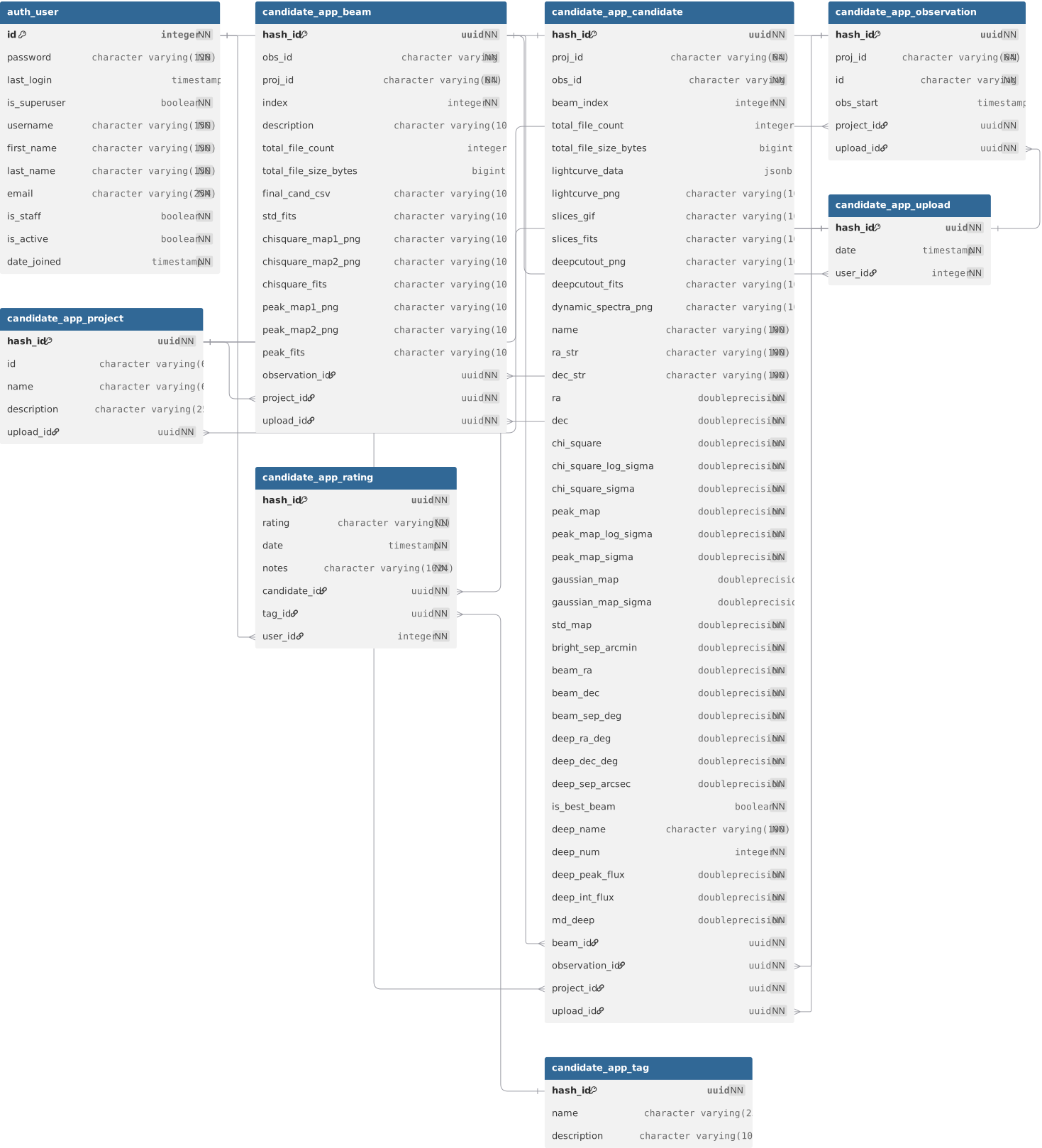
Clearing the database
Deleting all content from the database can be done by stopping and starting up the docker containers with the volume flag -v. All of the data is stored in docker volumes and not in the containers themselves.
To stop the docker containers and delete the volumes:
make prod-down
docker volume rm $(docker volume ls -q | grep vaster)
and simply start the containers again with
make prod
Candidate min/max stats materialized view
The candidate_min_max_stats materialized view (created in migration 0004) stores precomputed MIN/MAX values for all filterable float fields on the candidate_app_candidate table. It is used to set the bounds of the filter sliders on the candidate table page.
The view is kept up to date by a pair of database objects also created in 0004:
refresh_candidate_min_max_stats()— a PL/pgSQL (Procedural Language/PostgreSQL) function that callsREFRESH MATERIALIZED VIEW candidate_min_max_stats.refresh_candidate_min_max_stats_trigger— a statement-level trigger that firesAFTER INSERT OR UPDATE OR DELETEoncandidate_app_candidateand calls the function above.
On the Django side, CandidateMinMaxStats is a managed = False model mapped to this view, so Django can query it via the ORM without attempting to manage its schema.
Migrations that modify the candidate table
Because the trigger fires on every INSERT, UPDATE, and DELETE statement against candidate_app_candidate, any migration that performs bulk row operations (e.g. adding a column and backfilling data) will repeatedly refresh the materialized view — once per statement — which can be extremely slow.
To avoid this, such migrations should drop the trigger before the bulk work and recreate it afterwards. See migration 0008 for the canonical example of this pattern.
ATNF Pulsars
The full ATNF pulsar catalogue is imported into the webapp on first start-up. This is done to make the searching of the database much quicker rather than making a web request for each search on the candidate rating page.
The pulsar catalogue is regularly updated automatically at 12am Sunday every week by the Django web container. This is done using a cron job defined in the containers/web/refresh_pulsar_table_cron file.
Alternatively, you can force the update manually by using the following docker command on the host machine:
docker exec -it ywangvaster-web python3 /ywangvaster_webapp/manage.py refresh_pulsar_table
This will download and parse the full ATNF database and overwrite the current version of the table in the Postgres container. When running the update command you will see logs printed to the terminal.