Architecture
Development
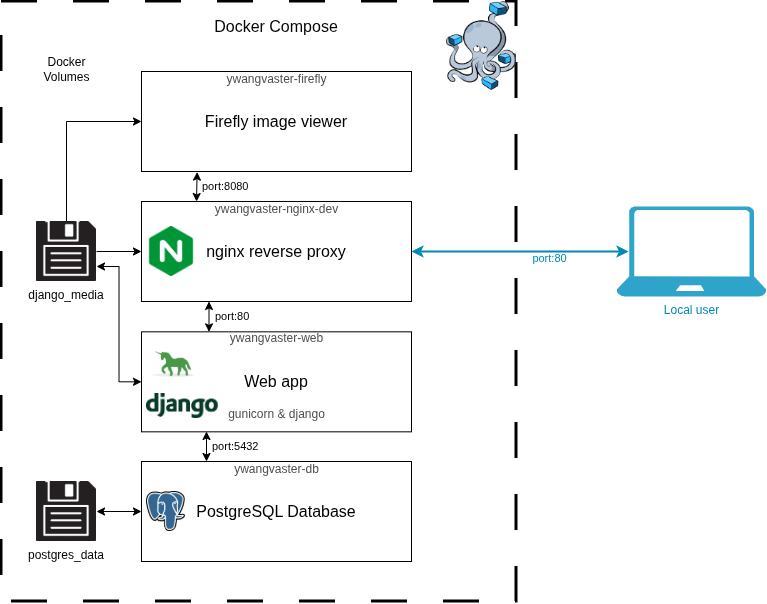
The development version of the web app uses three docker containers in an isolated docker network:
Django: Python application that handles the web content.
Postgres: A SQL database that holds all of the website and candidate data.
Firefly: An interactive FITS viewer embedded in the candidate rating page.
All of the candidate images and other files from the observations are stored a separate docker volume of “django_media”, and the postgres database files are stored in the “postgres_data” volume. The docker network structure for the development version is the following:
Production
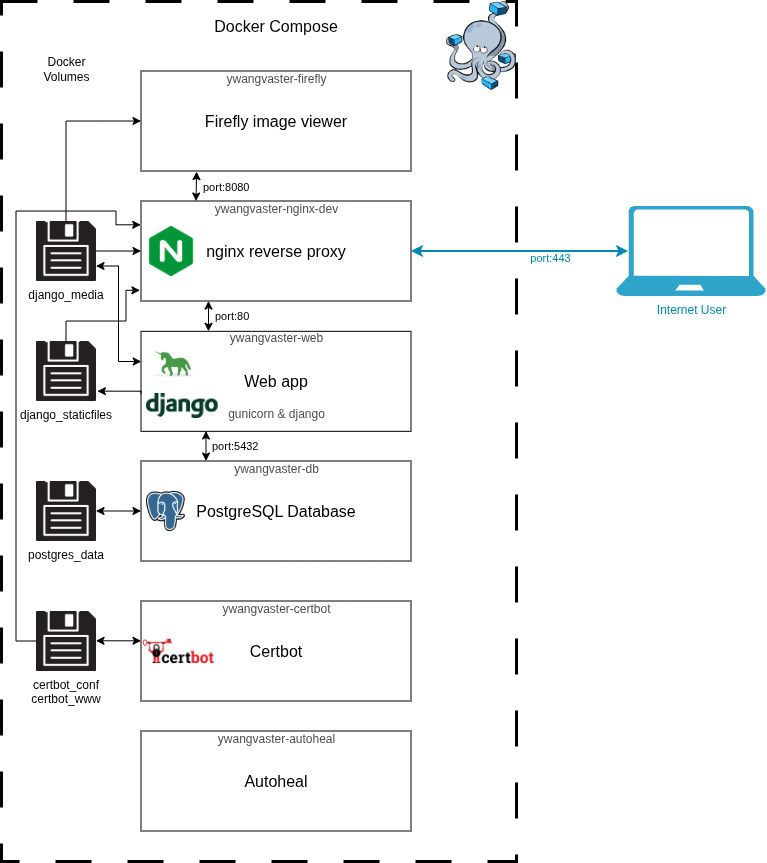
The production version is very similar to development, however the Django application is run using Gunicorn instead to assist with handling a number of requests at once. Three more containers are added in this configuration:
Nginx: Terminates HTTPS (port 443) using Let’s Encrypt certificates, redirects HTTP to HTTPS (port 80), proxies requests to Django and Firefly, and serves static/media files directly.
Certbot: Automatically renews the Let’s Encrypt TLS certificate every 12 hours.
Autoheal: A container that watches every other container and will restart them if it sees that they are in a damaged or some form of error state.
The docker network structure for production is as follows:
Staging
The staging environment is identical to production in its container structure. It displays a [STAGING] indicator in the header bar. A staging-details.html file can optionally be placed in the repo root to display release notes on the staging home page.
Docker Compose file structure
The Docker Compose configuration is split across multiple files that are layered together by the Makefile:
File |
Purpose |
|---|---|
|
Base service definitions shared across all environments |
|
Development-specific overrides (port mapping, debug settings) |
|
Production-specific additions (Nginx, Certbot, Autoheal, Gunicorn) |
|
Staging-specific overrides (layered on top of prod) |
|
Local volume path configuration |
Makefile
All environment management is done through the Makefile. Available targets:
Target |
Description |
|---|---|
|
Start the development environment (Django + Postgres + Firefly) |
|
Stop the development environment |
|
Start the production environment in detached mode |
|
Stop the production environment |
|
Start the staging environment in detached mode |
|
Stop the staging environment |
|
Obtain a Let’s Encrypt certificate for production |
|
Obtain a Let’s Encrypt certificate for staging |
All up targets pass --build so images are rebuilt automatically when code changes.